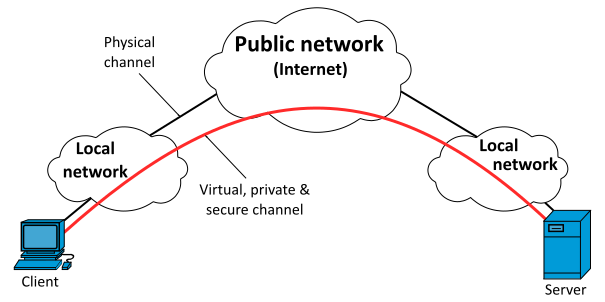
A Virtual Private Network routes internet traffic through an encrypted tunnel between a user's device and a server operated by the VPN provider. From the perspective of any service the user connects to, the apparent origin of the traffic is the VPN server rather than the user's actual location. Traffic on the network between the device and the VPN server is encrypted, making it unreadable to the ISP and to anyone monitoring the local network.
For private users in Poland, the primary reasons to use a VPN are protection on untrusted networks — public Wi-Fi at cafes, airports and hotels — and limiting what the ISP can observe about browsing habits. This article does not address corporate VPN scenarios, which involve different architecture and policy considerations.
What a VPN does and does not protect
A VPN encrypts traffic between your device and the VPN server. It does not encrypt traffic between the VPN server and the website you connect to — that encryption depends on the site using HTTPS, which the overwhelming majority of sites now do. A VPN does not protect against malware already on your device, and it does not make you anonymous: the VPN provider can see your traffic unless they maintain a verified no-log policy.
On public Wi-Fi: On an unencrypted public Wi-Fi network, other users on the same network can intercept unencrypted traffic. A VPN prevents this by encrypting everything from your device outward. Even on encrypted Wi-Fi, the network operator can see traffic metadata. A VPN limits what the network operator observes.
VPN protocols compared
A protocol defines how the encrypted tunnel is established and maintained. The choice of protocol affects speed, reliability and the size of the attack surface.
WireGuard
WireGuard is a modern protocol with a codebase of roughly 4,000 lines — substantially smaller than OpenVPN or IKEv2. Fewer lines of code mean a smaller surface for security vulnerabilities and easier independent auditing. It uses fixed, modern cryptography (Curve25519 for key exchange, ChaCha20-Poly1305 for encryption) and is now integrated into the Linux kernel. Most major VPN providers support WireGuard. It is the recommended choice for new setups as of 2026.
OpenVPN
OpenVPN has been in production use since 2002 and has an extensive audit history. It is highly configurable and works on virtually every platform. The trade-off is higher complexity and lower throughput compared to WireGuard. It remains a reasonable choice on platforms where WireGuard support is limited.
IKEv2/IPsec
IKEv2 handles connection drops and network changes well, which makes it suitable for mobile use. It is natively supported by Windows, macOS, iOS and Android without additional software. The implementation quality varies between providers; the protocol itself is sound when configured correctly.
Avoid
PPTP has known cryptographic weaknesses and should not be used. L2TP/IPsec without certificate pinning provides limited assurance. Any provider offering only these protocols warrants scrutiny.
Selecting a provider: criteria relevant in Poland
Choosing a VPN provider requires evaluating claims that cannot always be independently verified. The following criteria are meaningful starting points:
No-log policy with independent audit
A provider's claim that it retains no traffic or connection logs is only as strong as the evidence behind it. Independent audits of infrastructure and policy — not just code — provide substantially more confidence than self-attestation. Providers that have published audit results include Mullvad, ProtonVPN and IVPN.
Jurisdiction
A provider registered in the EU is subject to GDPR and to data requests from EU member state authorities. Providers registered in Switzerland operate under Swiss law, which has historically required court orders for data disclosure and does not participate in the Five Eyes intelligence alliance. Jurisdiction matters only if the provider actually retains logs — a verified no-log provider in any jurisdiction cannot disclose what it does not have.
Open-source clients
Providers whose client applications are open-source allow independent review of what the software actually does. Mullvad and ProtonVPN publish their client code on GitHub.
Payment options
Providers that accept cash by post (Mullvad) or cryptocurrency reduce the linkage between payment identity and account identity for users for whom that matters.
Setup on Windows
The steps below use WireGuard, which has a standalone Windows client available at wireguard.com/install.
- Download and install the WireGuard client from the official site.
- Log into your VPN provider's account portal and generate a WireGuard configuration file for the server location of your choice. Each provider has a different interface for this step; the result is a
.conffile. - Open the WireGuard client, click "Import tunnel(s) from file" and select the downloaded
.conffile. - Click "Activate" to connect. The interface will display your assigned IP address and the server endpoint.
- Verify the connection by navigating to dnsleaktest.com and checking that the displayed IP and DNS servers correspond to the VPN provider, not your ISP.
Setup on Android
- Install the WireGuard app from the Google Play store (published by the WireGuard Development Team).
- In your provider's portal, generate a WireGuard config or QR code.
- In the WireGuard app, tap the plus icon and select "Scan from QR code" or "Import from file".
- Tap the toggle next to the tunnel name to connect. Android will display a key icon in the status bar when a VPN is active.
- In Android Settings → Network → VPN, enable "Always-on VPN" for the tunnel and "Block connections without VPN" to prevent unencrypted fallback if the VPN disconnects.
Setup on iOS
- Install the WireGuard app from the App Store (published by WireGuard Development Team).
- Generate a WireGuard config or QR code from your provider's portal.
- In the WireGuard app, tap the plus icon and choose "Create from QR code" or "Create from file or archive".
- Tap "Allow" when iOS asks for permission to add a VPN configuration.
- Toggle the connection on. A VPN indicator appears in the iOS status bar.
On kill switches: Most paid VPN clients include a kill switch that blocks internet traffic if the VPN connection drops unexpectedly. Enable this in the client settings. On Android, the system-level "Block connections without VPN" option serves the same purpose and does not depend on the provider's client.
DNS leak testing
DNS queries reveal which sites a user visits even when traffic is encrypted. A VPN that handles DNS correctly routes all DNS queries through the encrypted tunnel to the provider's own DNS servers. Testing at dnsleaktest.com or ipleak.net after connecting shows whether DNS queries are leaving through your ISP. If the test shows your ISP's DNS servers while connected to a VPN, the VPN is leaking DNS and the provider should be contacted or replaced.
Legal context in Poland
Using a VPN for personal privacy is legal in Poland. There is no legislation requiring private individuals to disclose VPN use or prohibiting its use for lawful purposes. Polish ISPs are required under the Telecommunications Law (Prawo telekomunikacyjne) to retain certain metadata for law enforcement purposes; a VPN limits what the ISP can observe, but this does not make the user legally liable for using one.

